


Launching Palette Desktop
Palette Desktop is here — a desktop app for running Claude Code and Codex on shared team folders. For the parts of the company that aren't engineering.
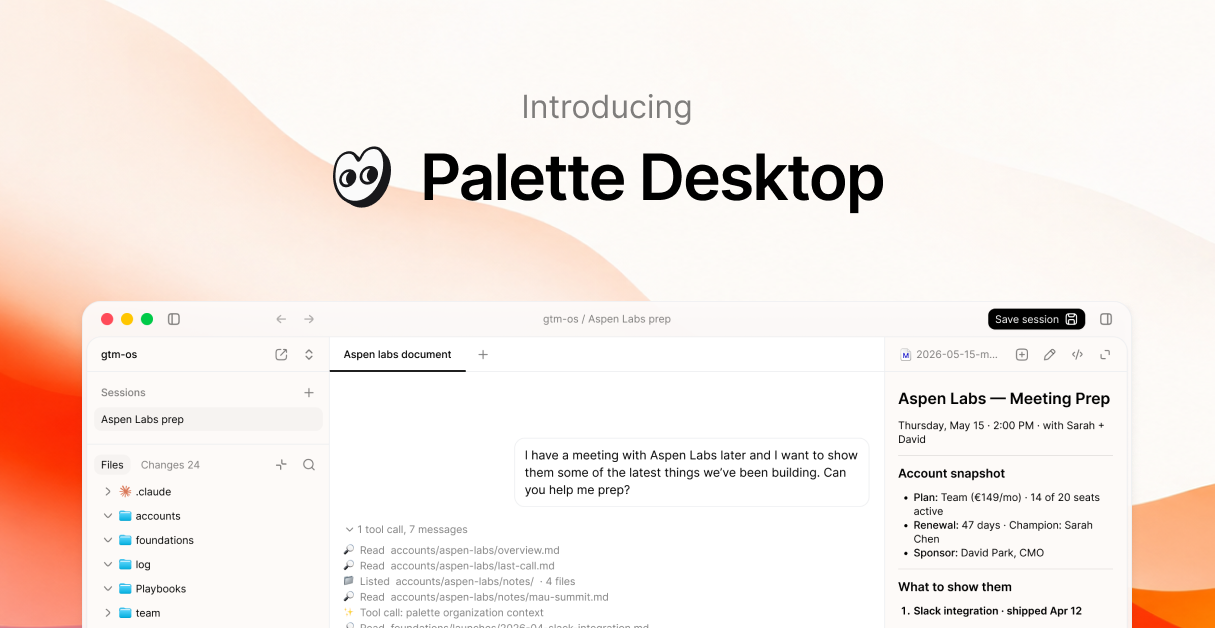
AI is only as good as the context it has. So we kept giving it more.
Better prompts. Then project folders. Then Claude.md files. Then skills, whole systems built around the agent so it would just know, instead of having to be told.
People started sharing their folder structures online. Their setups, their workflows, their skills. Something clicked. Folders and markdown, the most ordinary way we already organize knowledge, turned out to be exactly the right shape for an agent.
Then teams got involved. People synced folders through Dropbox, iCloud, and Drive as a hack to share context with the rest of the team. Cowork shipped. IDEs grew on top of the Claude Code CLI, because the terminal isn't for everyone, least of all non-engineers.
Every step was a workaround for the same gap: shared context, on the agent of your choice, for the whole team. Today we're launching Palette Desktop to fill it.
What it is
Point Palette Desktop at any folder on Google Drive or Dropbox. Share the folder with your team. That folder is now your team's workspace.
You run agents inside sessions. A session is a sandboxed clone of the folder where you can work safely. Each session can hold multiple chats running in parallel, each focused on a different task. When you're ready, you save the whole session back to the shared folder. That's the difference between Palette Desktop and chats that write straight to the folder: a team can share the same folder without stepping on each other.
A few things Palette Desktop comes with out of the box:
- Choose your agent. Switch between Claude Code and Codex per session. Your context isn't locked to one vendor.
- Multiple sessions in parallel. Run several at once, each working on a different thing.
- Approve every change. Palette Desktop stages each session's changes so you review before they save back.
- Changes history. Browse, compare, restore with one click.
- Templates. Pre-made folder structures for go-to-market, startup, and ops work, so you don't start from blank.
- Shortcuts. Pin your most-used commands, skills, and prompts.
No terminal. No git. Most people are in their first session within minutes.
"Most AI tools built for work were built for engineers. That left everyone else stuck on chat tools. We built Palette Desktop for the rest of the company."
— Lars, CEO
Not for engineering
This isn't for writing code. Engineers already have Cursor, Conductor, and Claude Code in the terminal for that.
Palette Desktop is for everything else: writing, research, planning, ops, GTM, design. The founders, GTM teams, ops, product managers, designers, and content people who've started using Claude or ChatGPT and feel like there's more to get out of it.
You shouldn't need to know what a terminal is to run a powerful AI agent on your work.
What people are doing with it
We've been running Palette Desktop ourselves for months and with a small group of design partners externally for a few weeks. Early feedback has been good. We're shipping more of it every week.
"Palette Desktop and its folder structure is the most effective way our team has used Claude Code so far."
— Cal Brennan, Product & Growth Lead, KIN AI
"I'm almost 80% of the time in Palette Desktop. I broke up with Claude CLI and Cowork. Almost."
— Denitsa, Product Manager, Lab08
With the Palette context layer
Palette Desktop gives agents access to your folders. With the Palette context layer turned on, they also know what's happening around them.
A campaign brief is more useful when the agent knows the launch date moved. An account summary is better when it knows the customer escalated yesterday. A hiring plan is sharper when it knows the team's priorities changed last week.
The context layer connects to the tools your team already uses (Slack, Linear, Notion, calendar, email), turns daily activity into structured signals, and keeps a living map of your organization available to your agents.
Agents should not need a manual briefing every time they start. With the context layer, they don't.
Try it
One flat rate for your org. Free for up to 200 Palette credits per month, with unlimited users. The Team plan is €149/month for unlimited credits per month, as our intro deal. Bring your own Claude Code or Codex subscription either way.
— Team Palette