> ## Documentation Index
> Fetch the complete documentation index at: https://palette.team/docs/llms.txt
> Use this file to discover all available pages before exploring further.
# Changelog
> What shipped in Palette Desktop and Palette, newest first.
## **A rebuilt interface, and Fable for your most important work**
 Chat, the file explorer, settings, dialogs and notifications are now built from the same set of components. The app looks and behaves the same wherever you are in it.
Most of this release went into saving your work. If your workspace lives in Google Drive or iCloud, sessions start faster, save more reliably, and tell you what went wrong instead of failing quietly.
* **Share links that update in place**: reshare a project and the link you already sent stays current, instead of going stale.
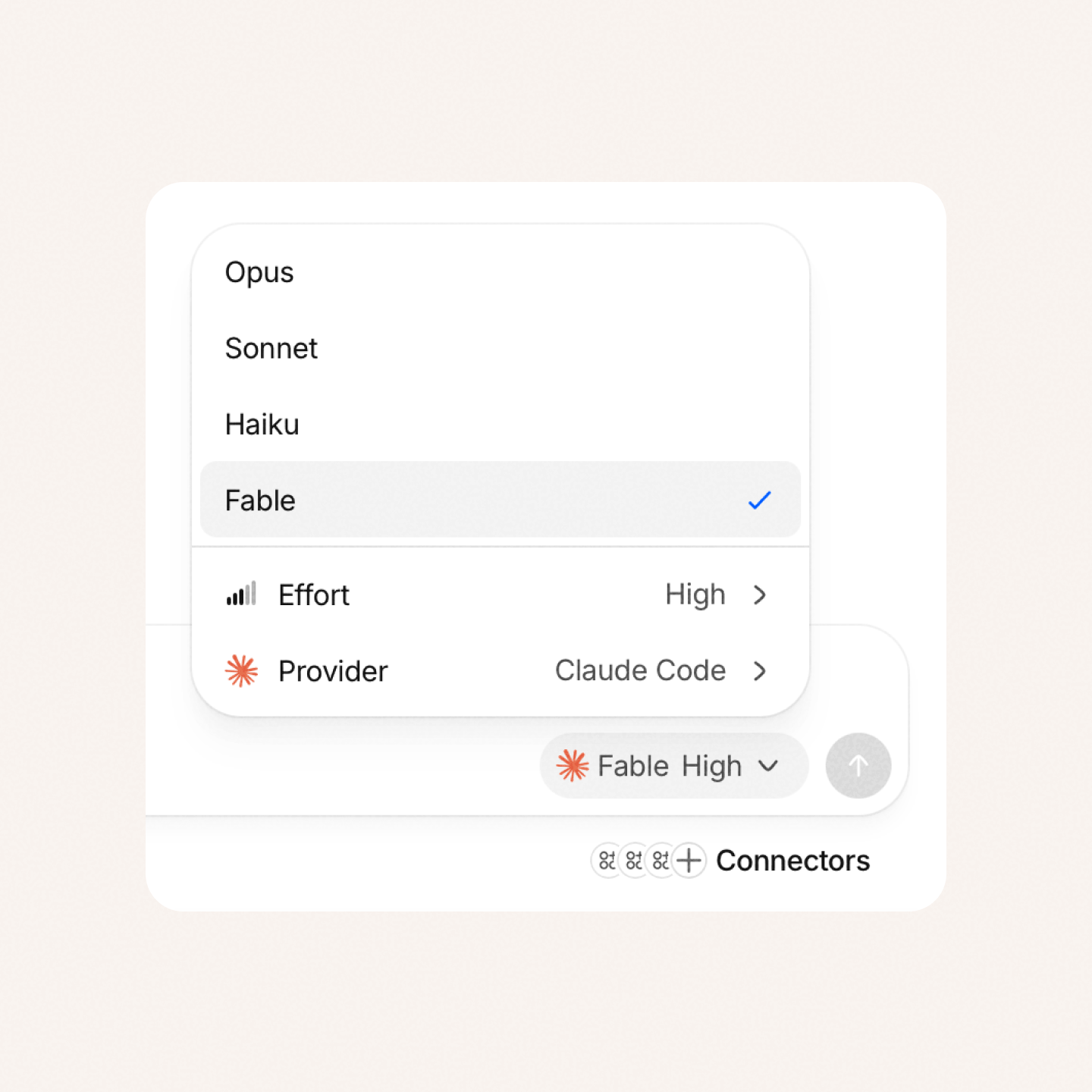
* **Fable**: now one of the Claude Code models you can choose.
* **Frontmatter in the viewer**: markdown files show their frontmatter as a compact summary at the top, not as raw text.
* **A close button in the viewer**: dismiss a previewed file straight from its header.
* **Installed skills, listed properly**: your skills show up in the actions list straight away, each labelled with where it came from.
* **Faster session creation on cloud folders**: Drive and iCloud folders are prepared at the same time, so a new session starts sooner.
* **Session-open safety check**: Palette checks a session as it opens and tells you if something is wrong.
* **Smoother saving on large projects**: a big save no longer freezes the app, so you can keep working while it finishes.
* **Cleaner checkpoints**: hidden system files like `.DS_Store` no longer land in your checkpoint history.
* **Refreshed interface throughout**: chat, the explorer, settings, dialogs and notifications now share one set of components.
* **Sessions that would not save**: conflicts, locked files and large changes no longer leave a session stuck, and failures now surface instead of passing silently.
* **A frozen app on cloud folders**: opening a folder in iCloud or Drive shows progress instead of hanging.
* **Permanently stuck sessions**: a session can no longer end up locked with no way to carry on.
* **Stacked permission requests**: simultaneous prompts queue up instead of replacing one another.
* **Missing session folders**: a session whose folder disappears while a checkpoint is being saved no longer breaks the app.
You can update from Settings.
## Cloud and self-hosted models for the Palette agent
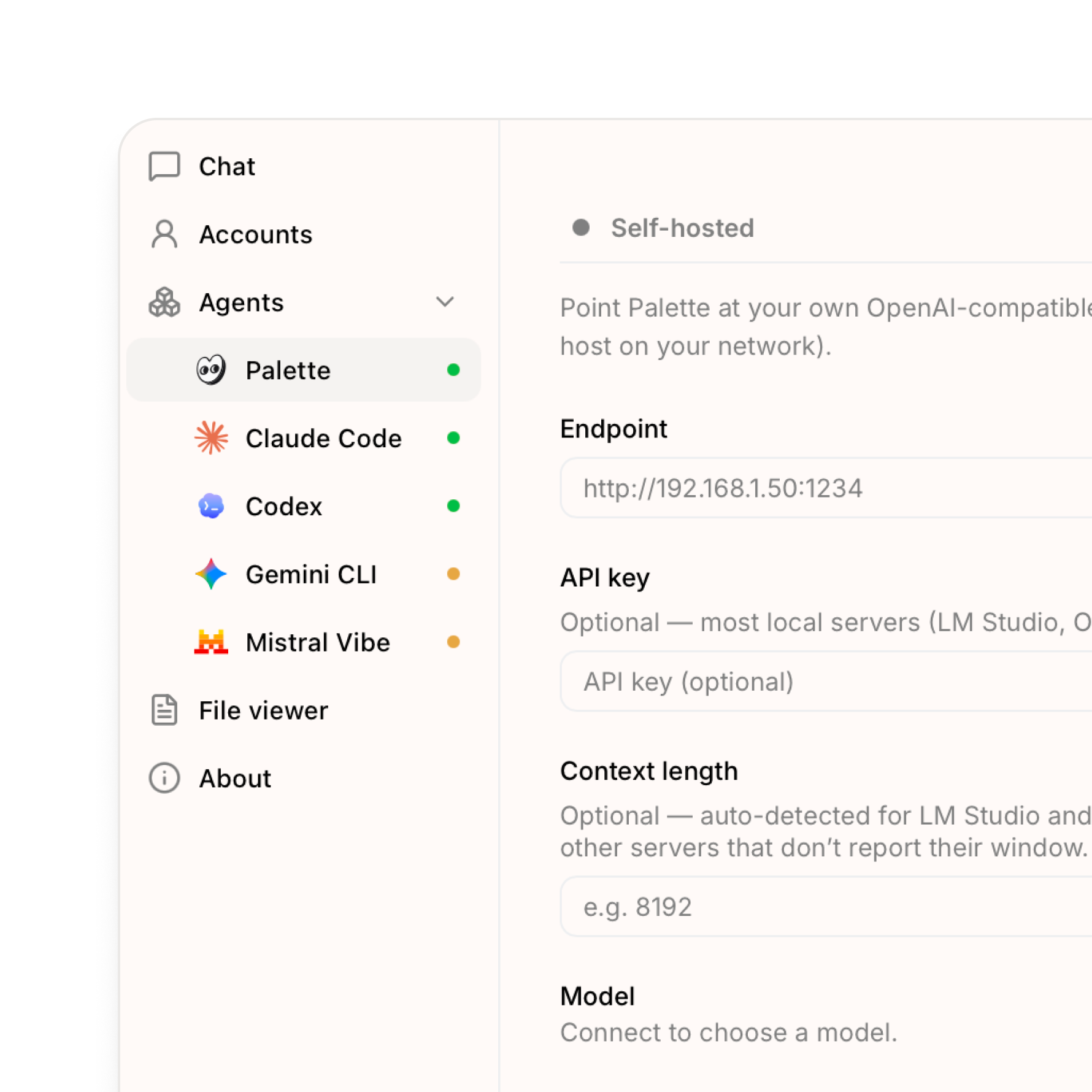
Now you can run the Palette agent on a model we host for you, or on your own server. Together with the on-device model from last time, that gives you three ways to run Palette, and you choose which one each tab uses. The difference is mostly about where the model runs and who hosts it:
* **Cloud** — a model Palette hosts for you (currently DeepSeek). Sign in and it's ready, nothing to download. The easiest option and a good default.
* **On-device** — a model that runs on your own computer (Qwen). It works offline and nothing you type leaves your machine, so it's the most private. These models are smaller and less capable, so they're best for everyday tasks.
* **Self-hosted** — connect to a model server you run yourself (LM Studio, Ollama, or any OpenAI-compatible host on your network). The most control.
- **Cloud models** — use a model hosted by Palette, ready as soon as you sign in. Nothing to download.
- **Self-hosted models** — point Palette at your own OpenAI-compatible server (LM Studio, Ollama, or any host on your network).
- **A model source per tab** — use the cloud model in one tab and a private one in another. A readiness dot next to each source shows what's good to go.
- **Share externally** — publish an HTML page you've built in Palette as a public link, and set how long it stays live (1, 7, 30, or 60 days, or a custom window).
* **Onboarding** — Palette shows up as a ready-to-use agent during first-run setup.
* **Chat context pill** — the context indicator and history trimming now track the model source you're actually using.
* **Quickstart window** — adding a workspace no longer closes the setup window unexpectedly.
* **Explorer header** — header actions line up on the right again.
You can update from Settings. After updating, go to Settings → Agents → Palette to pick a model source.
## Cloud and self-hosted models for the Palette agent

Now you can run the Palette agent on a model we host for you, or on your own server. Together with the on-device model from last time, that gives you three ways to run Palette, and you choose which one each tab uses. The difference is mostly about where the model runs and who hosts it:
* **Cloud** — a model Palette hosts for you (currently DeepSeek). Sign in and it's ready, nothing to download. The easiest option and a good default.
* **On-device** — a model that runs on your own computer (Qwen). It works offline and nothing you type leaves your machine, so it's the most private. These models are smaller and less capable, so they're best for everyday tasks.
* **Self-hosted** — connect to a model server you run yourself (LM Studio, Ollama, or any OpenAI-compatible host on your network). The most control.
- **Cloud models** — use a model hosted by Palette, ready as soon as you sign in. Nothing to download.
- **Self-hosted models** — point Palette at your own OpenAI-compatible server (LM Studio, Ollama, or any host on your network).
- **A model source per tab** — use the cloud model in one tab and a private one in another. A readiness dot next to each source shows what's good to go.
- **Share externally** — publish an HTML page you've built in Palette as a public link, and set how long it stays live (1, 7, 30, or 60 days, or a custom window).
* **Onboarding** — Palette shows up as a ready-to-use agent during first-run setup.
* **Chat context pill** — the context indicator and history trimming now track the model source you're actually using.
* **Quickstart window** — adding a workspace no longer closes the setup window unexpectedly.
* **Explorer header** — header actions line up on the right again.
You can update from Settings. After updating, go to Settings → Agents → Palette to pick a model source.
## You can now run local models in Palette Desktop
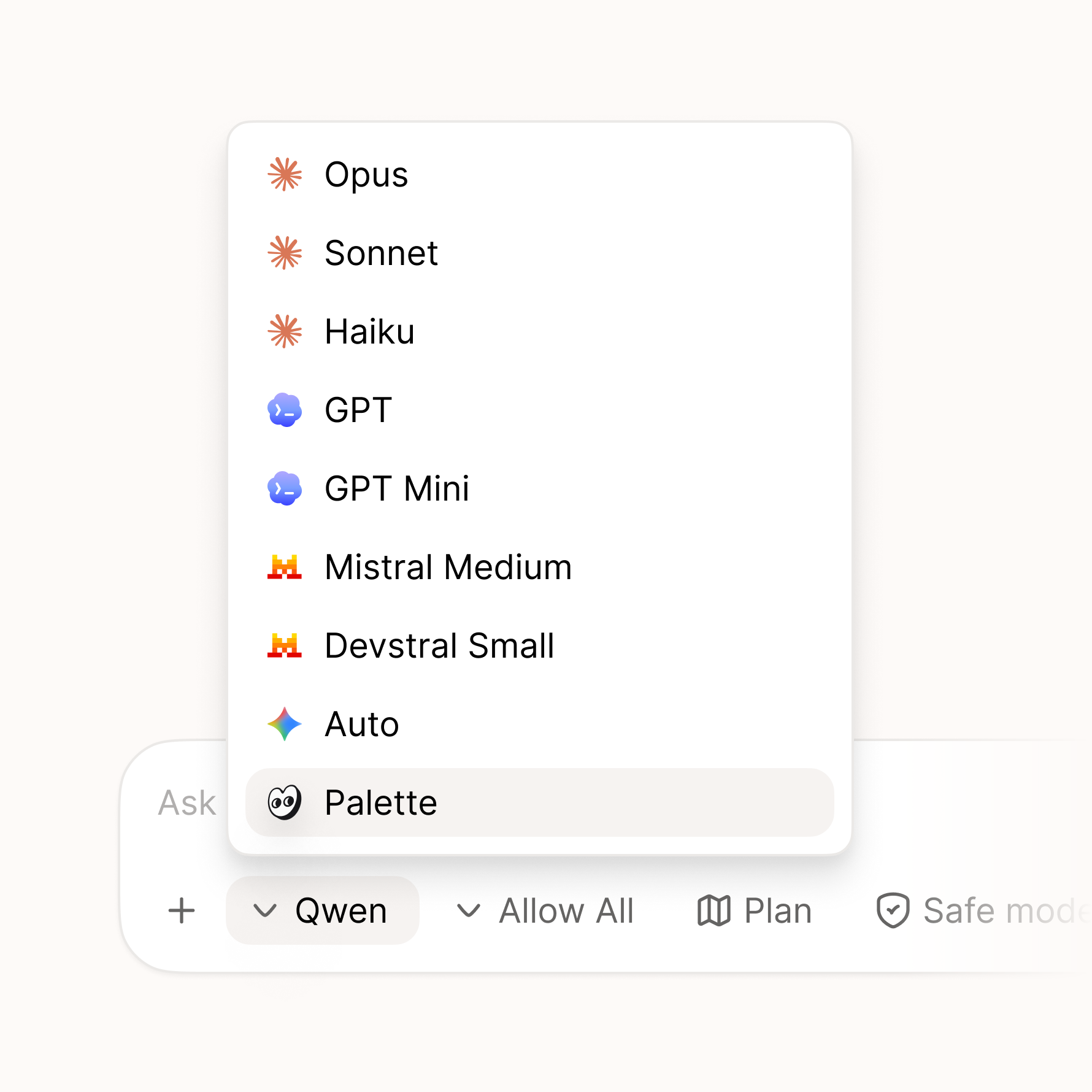
Palette Desktop can now run a local model through a built-in Palette agent. Choose a model like Qwen in Settings, then pick Palette in chat. Palette handles the setup and gives the model access to your folder with the same controls you use for other agents. No separate provider account or API key is needed for the local agent.
We're starting with Qwen, an open-source model from Alibaba. The setup is built so more local models can be added over time. When you use Palette this way, the model runs on your computer, works offline, and nothing you type leaves your device. Local models are smaller and less capable than cloud models like Claude, so they're best for everyday tasks rather than the hardest ones.
* **Palette as a local agent** — pick Palette in chat and run it locally on your computer.
* **On-device model setup** — download what Palette needs, choose Qwen, and manage it from Settings.
* **Private and offline** — while using the local Palette agent, your files and chat stay on your device and it works without a connection.
* **Model defaults** — set a default model in Settings, and keep different models per tab without them changing after restart.
* **Install progress** — local setup downloads keep going if Settings is closed, restore progress when reopened, and show a completion toast when ready.
* **Context page mentions** — the mention list now loads more directly and reliably.
* **Update delivery** — update feeds now use `dl.palette.team/desktop` for more reliable delivery.
* **Getting started** — the "Help me get started" button now creates the session and sends the guide correctly.
* **Plan history** — plans from plan mode stay visible when you reopen a session's history.
* **Tooltips** — tooltips now show the current title instead of old cached text.
* **Gemini errors** — Gemini history and session-list errors now show readable messages.
* **Claude Code install** — installing Claude Code through Palette works better on machines without Node installed.
You can update from Settings. After updating, go to Settings → Agents → Palette to try the local setup.
## You can now run local models in Palette Desktop

Palette Desktop can now run a local model through a built-in Palette agent. Choose a model like Qwen in Settings, then pick Palette in chat. Palette handles the setup and gives the model access to your folder with the same controls you use for other agents. No separate provider account or API key is needed for the local agent.
We're starting with Qwen, an open-source model from Alibaba. The setup is built so more local models can be added over time. When you use Palette this way, the model runs on your computer, works offline, and nothing you type leaves your device. Local models are smaller and less capable than cloud models like Claude, so they're best for everyday tasks rather than the hardest ones.
* **Palette as a local agent** — pick Palette in chat and run it locally on your computer.
* **On-device model setup** — download what Palette needs, choose Qwen, and manage it from Settings.
* **Private and offline** — while using the local Palette agent, your files and chat stay on your device and it works without a connection.
* **Model defaults** — set a default model in Settings, and keep different models per tab without them changing after restart.
* **Install progress** — local setup downloads keep going if Settings is closed, restore progress when reopened, and show a completion toast when ready.
* **Context page mentions** — the mention list now loads more directly and reliably.
* **Update delivery** — update feeds now use `dl.palette.team/desktop` for more reliable delivery.
* **Getting started** — the "Help me get started" button now creates the session and sends the guide correctly.
* **Plan history** — plans from plan mode stay visible when you reopen a session's history.
* **Tooltips** — tooltips now show the current title instead of old cached text.
* **Gemini errors** — Gemini history and session-list errors now show readable messages.
* **Claude Code install** — installing Claude Code through Palette works better on machines without Node installed.
You can update from Settings. After updating, go to Settings → Agents → Palette to try the local setup.
## Gemini and one-click installs for every agent
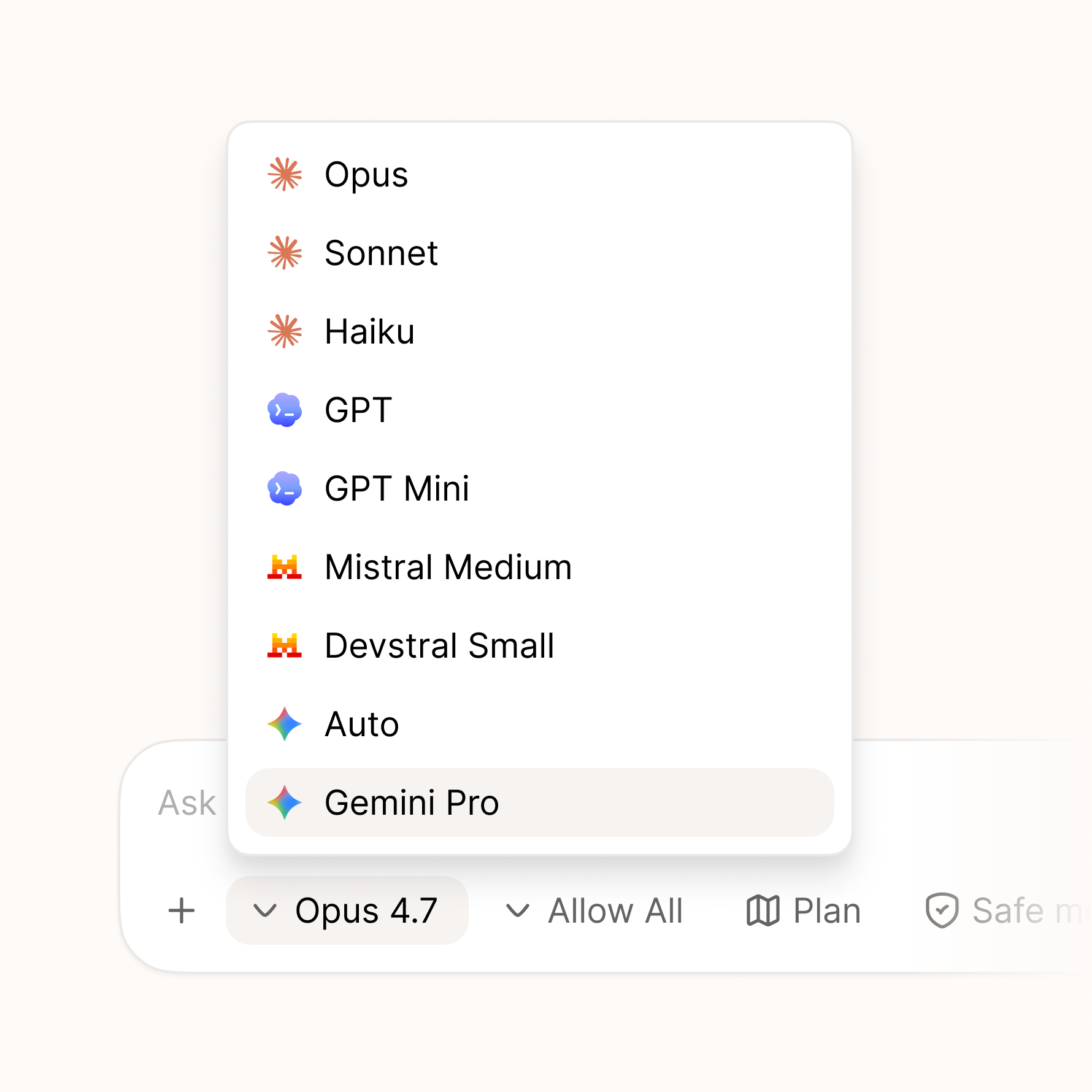
Another big release, with a lot packed in. The headline: Palette now supports Gemini, joining Claude Code, Codex, and Mistral — and getting any of them set up is now a single click. If you don't have a provider installed yet, Palette handles the setup for you, and for each one you choose whether to run it on your subscription or your own API key. A new person can be up and running in seconds instead of wrestling with a terminal.
Two more features we're excited about have also landed: HTML sharing and handoffs. Both are early, and each gets its own closer look in the next couple of weeks.
* **Gemini support** — Gemini is now available as a provider, joining Claude Code, Codex, and Mistral.
* **One-click provider install** — run any of them in Palette. If you don't have a provider installed yet, it's a single click and Palette sets it up for you, no terminal required.
* **Subscription or API mode** — for each provider, choose whether to run it on your subscription or your own API key.
* **HTML sharing** — share your work as a styled HTML page that anyone can open and comment on, even if they don't use Palette. A closer look coming in its own update shortly.
* **Handoffs** — hand off a piece of work to a teammate with the files and full chat context attached, so they pick up right where you left off. More on this in its own update shortly.
* **Rich markdown editing** — edit `.md` files in a what-you-see-is-what-you-get editor, and copy their markdown from the sidebar.
* **Interface zoom** — zoom the whole interface in and out across every window.
* **License viewer** — browse the open-source license attributions from inside the app.
* **Automatic Git setup** — if you don't have Git installed, Palette now installs it for you, so you're ready to go without any setup.
* **Redesigned settings** — a cleaner two-pane layout with a category rail alongside the content.
* **Smarter checkpoints** — manual file operations and edits made outside the app are now captured in your history.
* **Turn file links** — file pills in a turn now open the file directly instead of the checkpoint.
* **Zoom shortcuts** — Cmd +, Cmd -, and Cmd 0 now work regardless of your keyboard layout.
* **Markdown edits on switch** — your changes are no longer lost when switching between sessions.
* **Unsaved drafts** — drafts are now preserved when you update a session.
* **Signed commits** — Palette's internal commits are never GPG-signed, so they no longer fail for some setups.
* **Sharing feedback** — now opens an in-app survey instead of leaving the app.
[Download now](https://palette.team/desktop) or update to the latest in your settings. Let us know what feels better and what doesn't.
## Gemini and one-click installs for every agent

Another big release, with a lot packed in. The headline: Palette now supports Gemini, joining Claude Code, Codex, and Mistral — and getting any of them set up is now a single click. If you don't have a provider installed yet, Palette handles the setup for you, and for each one you choose whether to run it on your subscription or your own API key. A new person can be up and running in seconds instead of wrestling with a terminal.
Two more features we're excited about have also landed: HTML sharing and handoffs. Both are early, and each gets its own closer look in the next couple of weeks.
* **Gemini support** — Gemini is now available as a provider, joining Claude Code, Codex, and Mistral.
* **One-click provider install** — run any of them in Palette. If you don't have a provider installed yet, it's a single click and Palette sets it up for you, no terminal required.
* **Subscription or API mode** — for each provider, choose whether to run it on your subscription or your own API key.
* **HTML sharing** — share your work as a styled HTML page that anyone can open and comment on, even if they don't use Palette. A closer look coming in its own update shortly.
* **Handoffs** — hand off a piece of work to a teammate with the files and full chat context attached, so they pick up right where you left off. More on this in its own update shortly.
* **Rich markdown editing** — edit `.md` files in a what-you-see-is-what-you-get editor, and copy their markdown from the sidebar.
* **Interface zoom** — zoom the whole interface in and out across every window.
* **License viewer** — browse the open-source license attributions from inside the app.
* **Automatic Git setup** — if you don't have Git installed, Palette now installs it for you, so you're ready to go without any setup.
* **Redesigned settings** — a cleaner two-pane layout with a category rail alongside the content.
* **Smarter checkpoints** — manual file operations and edits made outside the app are now captured in your history.
* **Turn file links** — file pills in a turn now open the file directly instead of the checkpoint.
* **Zoom shortcuts** — Cmd +, Cmd -, and Cmd 0 now work regardless of your keyboard layout.
* **Markdown edits on switch** — your changes are no longer lost when switching between sessions.
* **Unsaved drafts** — drafts are now preserved when you update a session.
* **Signed commits** — Palette's internal commits are never GPG-signed, so they no longer fail for some setups.
* **Sharing feedback** — now opens an in-app survey instead of leaving the app.
[Download now](https://palette.team/desktop) or update to the latest in your settings. Let us know what feels better and what doesn't.
## Mistral, file editing, and a redesigned workspace
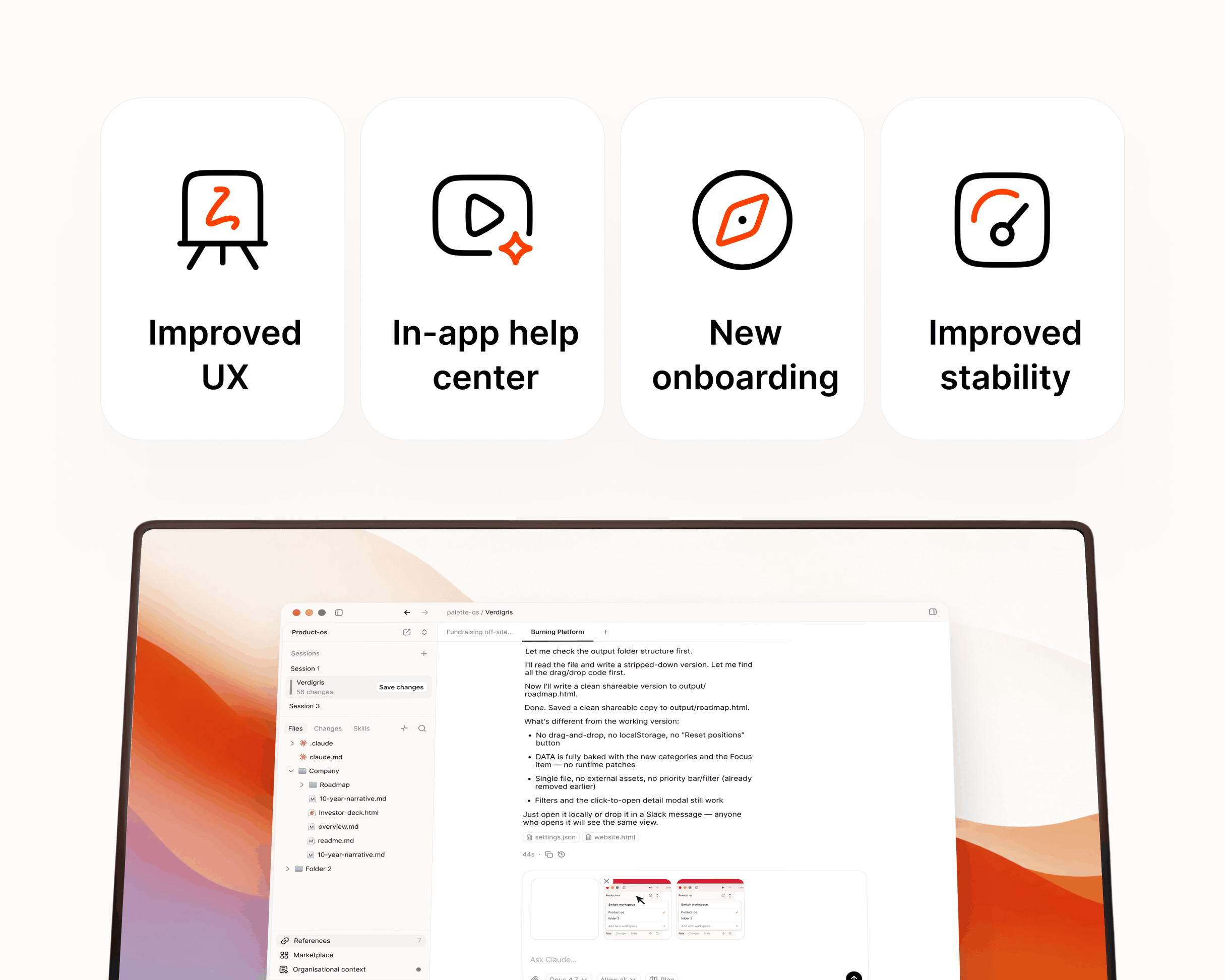
First update to Palette Desktop since launch, and it has quite a lot in it. You can now pick Mistral's Vibe agent as a provider, manage files hands-on right in the Files area, and sign in to your Palette account from the app. On top of that, there's a stack of polish across the workspace shaped by what early users have been telling us. Thank you for the notes — keep them coming.
* **Mistral Vibe provider** — pick Mistral's Vibe agent alongside your existing providers.
* **Your Palette account** — sign in to set up your account and organization, and see your profile right in the app.
* **Files area actions** — right-click to delete, rename, or create folders, drag files to move them, and drag in from Finder to copy them into your workspace.
* **Paste & drop images** — paste screenshots or clipboard images straight into chat, with a drop-to-attach overlay when you drag files over a session.
* **Report a Bug** — send feedback and bug reports straight from the app.
* **What's New** — friendly, in-app release notes after each update.
* **Tab shortcuts** — jump between tabs with native ⌃⇥ and ⌃⇧⇥ shortcuts.
* **Skills & History explorer** — a rebuilt Skills panel with source and provider filters, plus a reworked sidebar with Skills and History tabs that remember each session.
* **Context pages** — open References, Marketplace, Help, and your org's context as full main-area pages, with a redesigned Palette surface.
* **Feedback on plans** — instead of just accept or decline, reply with notes and the plan adjusts.
* **Chronological transcript** — sessions now read top to bottom with related tool runs grouped together.
* **Tab & session indicators** — clearer unread and attention markers across tabs and sessions.
* **Titlebar breadcrumb** — the currently open menu page now shows in the titlebar.
* **Cancel keeps your message** — cancelling before a response restores your text to the input so nothing is lost.
* **Redesigned flows** — refreshed create-workspace, marketplace, and template detail screens.
* **Empty states** — friendly illustrated placeholders for sessions, Files, Changes, and Skills.
* **Cleaner error messages** — interrupted plan tools read as "Interrupted" instead of the raw stream-closed CLI error, and decline/interrupt outcomes show as neutral chips rather than red errors.
* **Visual polish** — native tinted glass, cleaner chat code blocks, smoother tab hover and shimmer animations, and tighter alignment across rows, popovers, and icons.
* **Tab clicks** — closing a tab no longer crashes, and the whole tab is clickable, not just its label.
* **In-app links** — clicking a link no longer navigates away from the app.
* **Mentions & queued messages** — the mention popover and queued-message tray now stay tied to the active session.
* **Session states** — fixed cases where history and Skills could silently show up empty, and replaced a raw What's New heading with a friendly summary.
You can update to the latest in your settings. Let us know what feels better and what doesn't.
## Mistral, file editing, and a redesigned workspace

First update to Palette Desktop since launch, and it has quite a lot in it. You can now pick Mistral's Vibe agent as a provider, manage files hands-on right in the Files area, and sign in to your Palette account from the app. On top of that, there's a stack of polish across the workspace shaped by what early users have been telling us. Thank you for the notes — keep them coming.
* **Mistral Vibe provider** — pick Mistral's Vibe agent alongside your existing providers.
* **Your Palette account** — sign in to set up your account and organization, and see your profile right in the app.
* **Files area actions** — right-click to delete, rename, or create folders, drag files to move them, and drag in from Finder to copy them into your workspace.
* **Paste & drop images** — paste screenshots or clipboard images straight into chat, with a drop-to-attach overlay when you drag files over a session.
* **Report a Bug** — send feedback and bug reports straight from the app.
* **What's New** — friendly, in-app release notes after each update.
* **Tab shortcuts** — jump between tabs with native ⌃⇥ and ⌃⇧⇥ shortcuts.
* **Skills & History explorer** — a rebuilt Skills panel with source and provider filters, plus a reworked sidebar with Skills and History tabs that remember each session.
* **Context pages** — open References, Marketplace, Help, and your org's context as full main-area pages, with a redesigned Palette surface.
* **Feedback on plans** — instead of just accept or decline, reply with notes and the plan adjusts.
* **Chronological transcript** — sessions now read top to bottom with related tool runs grouped together.
* **Tab & session indicators** — clearer unread and attention markers across tabs and sessions.
* **Titlebar breadcrumb** — the currently open menu page now shows in the titlebar.
* **Cancel keeps your message** — cancelling before a response restores your text to the input so nothing is lost.
* **Redesigned flows** — refreshed create-workspace, marketplace, and template detail screens.
* **Empty states** — friendly illustrated placeholders for sessions, Files, Changes, and Skills.
* **Cleaner error messages** — interrupted plan tools read as "Interrupted" instead of the raw stream-closed CLI error, and decline/interrupt outcomes show as neutral chips rather than red errors.
* **Visual polish** — native tinted glass, cleaner chat code blocks, smoother tab hover and shimmer animations, and tighter alignment across rows, popovers, and icons.
* **Tab clicks** — closing a tab no longer crashes, and the whole tab is clickable, not just its label.
* **In-app links** — clicking a link no longer navigates away from the app.
* **Mentions & queued messages** — the mention popover and queued-message tray now stay tied to the active session.
* **Session states** — fixed cases where history and Skills could silently show up empty, and replaced a raw What's New heading with a friendly summary.
You can update to the latest in your settings. Let us know what feels better and what doesn't.
## Palette Desktop is here
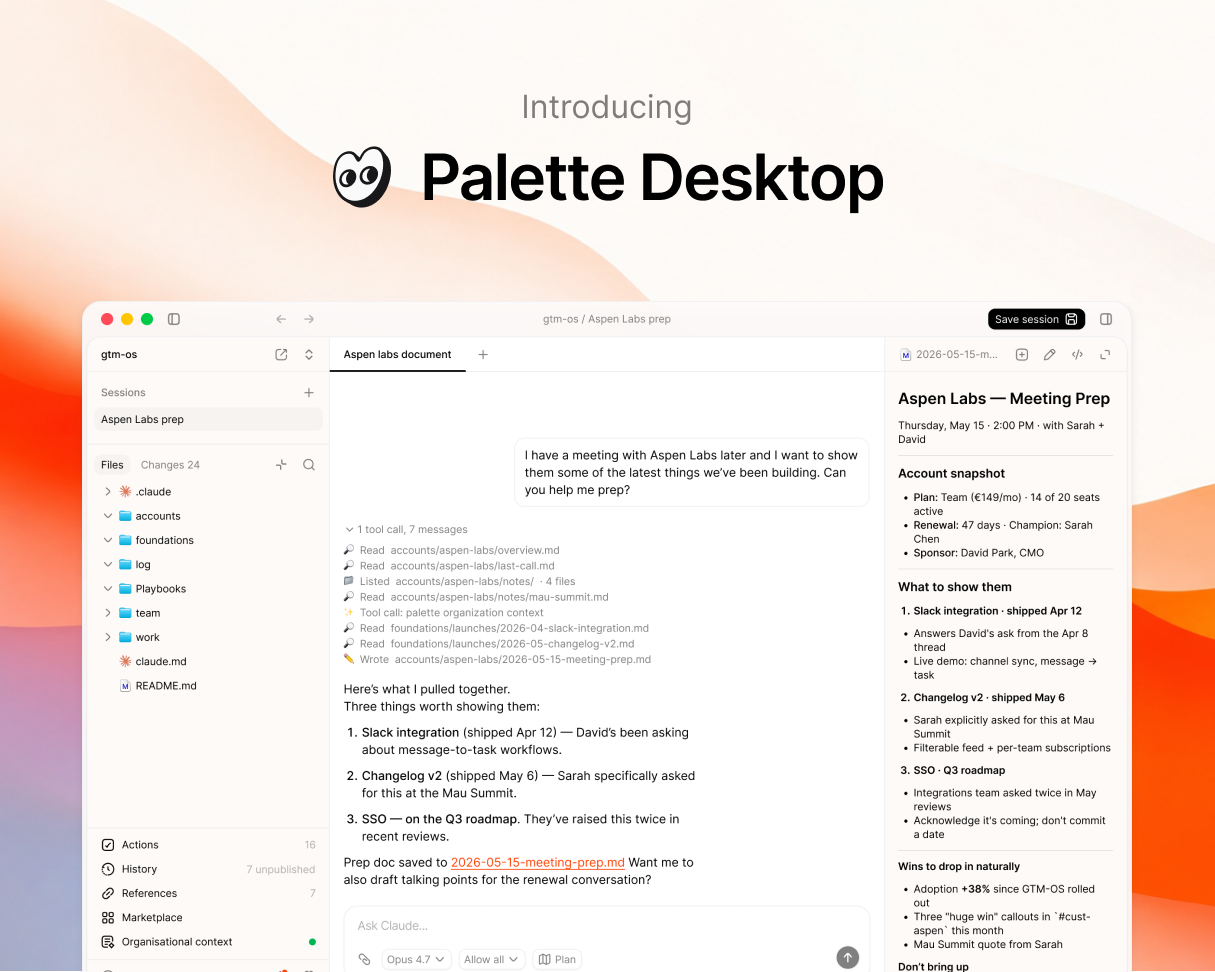
It's a desktop app for running Claude Code and Codex on shared team folders. Point it at a folder on Google Drive or Dropbox, share it with your team, and the folder becomes your team's workspace. No terminal. No git. Most people are in their first session within minutes.
We've been running it internally for months and with a small group of design partners for a few weeks. We're sharing it more broadly now.
### Sessions
A session is a sandboxed clone of your folder where you can work safely. Run multiple chats inside one session, each focused on a different task. When you're ready, save the whole session back to the shared folder. Reviewed, not chat-by-chat. That's how a team can share the same folder without stepping on each other.
* **Multiple chats per session.** Several chats in parallel, each on a different task.
* **Approve changes.** Every change is staged. You review before anything writes back.
* **Changes history.** Every change logged. Browse, compare, restore in one click.
### Agent choice
Palette Desktop runs Claude Code and Codex. Switch per session. Bring your own subscription either way. Your team's context isn't locked to one AI vendor.
* **Detects your agent.** Palette Desktop checks for Claude Code and Codex on your machine. If you don't have one yet, it helps you install.
### Templates
Open a new folder and pick a starter:
* **gtm-os** for go-to-market teams
* **startup-os** for founders
* **ops-os** for ops and PM teams
More on the way. You can also submit your own.
### Plus
A few more features to round out the workspace:
* **File viewer.** Markdown and HTML render inline. Toggle to raw with one click.
* **Actions list.** Every command and skill in your folder, surfaced and ready to run.
* **Shortcuts.** Pin your most-used commands, skills, and prompts.
* **Integrations.** See the MCPs and integrations connected to your agents in one place.
### The Palette context layer
The Palette context layer ships with Palette Desktop. It connects to the tools your team already uses (Slack, Linear, Notion, calendar, email), turns daily activity into structured signals, and serves a living map of your organization to your agents through MCP. On by default. Turn it off if you don't want it.
[Download for macOS →](https://dl.palette.team/desktop/stable/Palette.Desktop_universal.dmg)
## Palette Desktop is here

It's a desktop app for running Claude Code and Codex on shared team folders. Point it at a folder on Google Drive or Dropbox, share it with your team, and the folder becomes your team's workspace. No terminal. No git. Most people are in their first session within minutes.
We've been running it internally for months and with a small group of design partners for a few weeks. We're sharing it more broadly now.
### Sessions
A session is a sandboxed clone of your folder where you can work safely. Run multiple chats inside one session, each focused on a different task. When you're ready, save the whole session back to the shared folder. Reviewed, not chat-by-chat. That's how a team can share the same folder without stepping on each other.
* **Multiple chats per session.** Several chats in parallel, each on a different task.
* **Approve changes.** Every change is staged. You review before anything writes back.
* **Changes history.** Every change logged. Browse, compare, restore in one click.
### Agent choice
Palette Desktop runs Claude Code and Codex. Switch per session. Bring your own subscription either way. Your team's context isn't locked to one AI vendor.
* **Detects your agent.** Palette Desktop checks for Claude Code and Codex on your machine. If you don't have one yet, it helps you install.
### Templates
Open a new folder and pick a starter:
* **gtm-os** for go-to-market teams
* **startup-os** for founders
* **ops-os** for ops and PM teams
More on the way. You can also submit your own.
### Plus
A few more features to round out the workspace:
* **File viewer.** Markdown and HTML render inline. Toggle to raw with one click.
* **Actions list.** Every command and skill in your folder, surfaced and ready to run.
* **Shortcuts.** Pin your most-used commands, skills, and prompts.
* **Integrations.** See the MCPs and integrations connected to your agents in one place.
### The Palette context layer
The Palette context layer ships with Palette Desktop. It connects to the tools your team already uses (Slack, Linear, Notion, calendar, email), turns daily activity into structured signals, and serves a living map of your organization to your agents through MCP. On by default. Turn it off if you don't want it.
[Download for macOS →](https://dl.palette.team/desktop/stable/Palette.Desktop_universal.dmg)
## Briefs
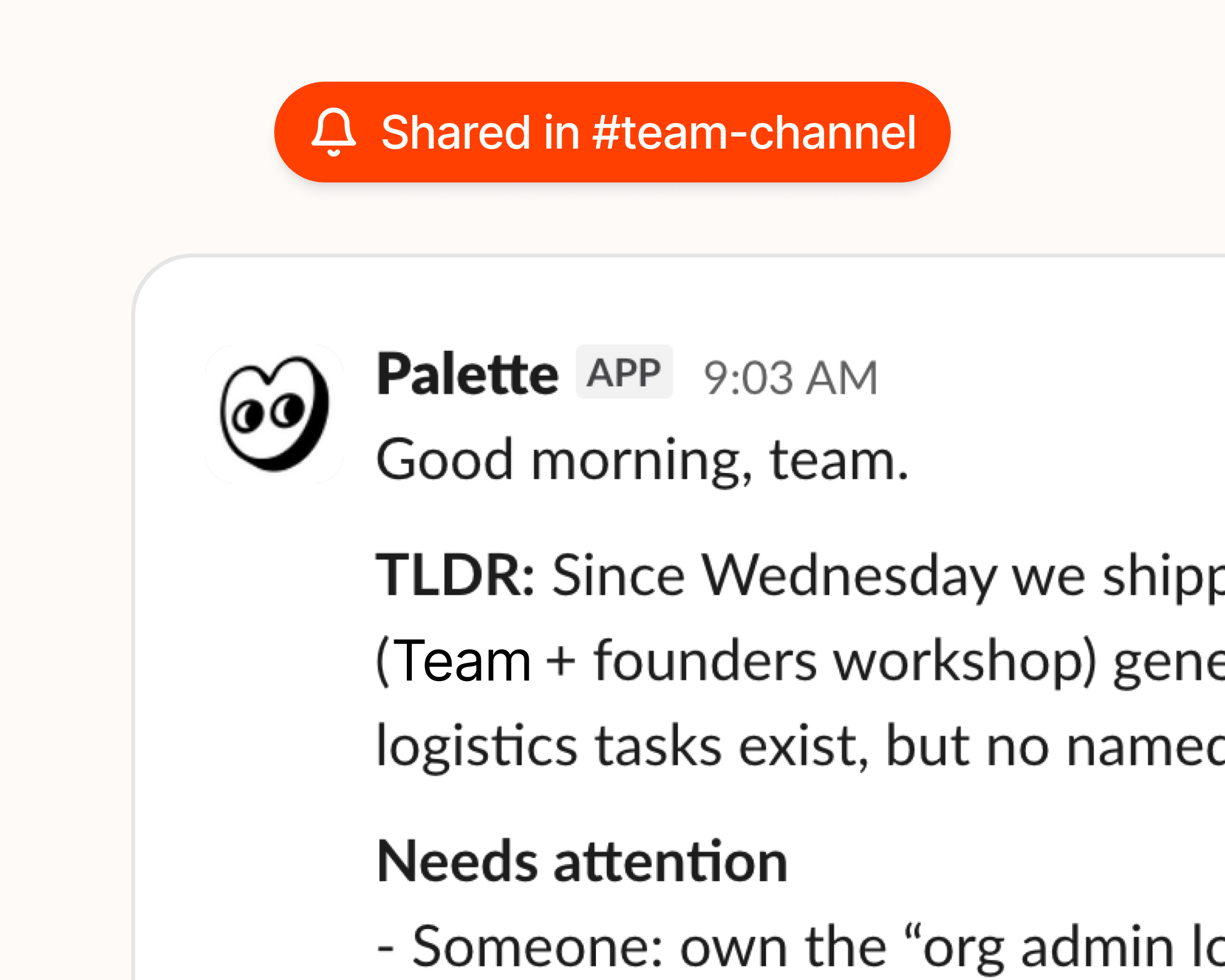
We just shipped Briefs — the morning brief your chief of staff would write, if you had one.
Briefs land in your team's Slack channel on the days you choose: TLDR, what needs attention, what's happening, and today's calendar. Tap through to the full version on the web — same as Slack plus what's moved and what's still unknown.
Most digest tools just repost what happened in your tools. Briefs are written on top of your Context pages — the always-current picture of how your team works — so they describe what changed, what matters, and what needs attention. Interpreted signals, not raw events.
You can enable Briefs under your team settings in Palette.
## Briefs

We just shipped Briefs — the morning brief your chief of staff would write, if you had one.
Briefs land in your team's Slack channel on the days you choose: TLDR, what needs attention, what's happening, and today's calendar. Tap through to the full version on the web — same as Slack plus what's moved and what's still unknown.
Most digest tools just repost what happened in your tools. Briefs are written on top of your Context pages — the always-current picture of how your team works — so they describe what changed, what matters, and what needs attention. Interpreted signals, not raw events.
You can enable Briefs under your team settings in Palette.
## Palette v1.0
Connect your tools. Build a living context map of your org. Serve it to your AI tools. That's the loop, and it's now complete. It took us a while to get here, and we rewrote more of it than we'd like to admit, but the core works and we're using it every day.
If you want to try it, [sign up here](https://palette.team/design-partner).
### Connectors
Palette connects to Slack, Linear, GitHub, Notion, Jira, and Google Calendar. You choose which channels, projects, and repos to connect. We only see what you explicitly add, nothing else.
Signals flow in from the tools your team already uses. No new habits required.
### Shared context
This is the core of Palette. From your tool signals, we build and maintain a living context map of how your org actually works:
* **Org level** — how the company operates, priorities, decisions, tools, culture
* **Team level** — what each team is working on, how they coordinate, blockers, progress
* **Person level** — individual focus, role, working style, current context
Everything is plain English, confidence-scored, and always updating. When we're confident about something, we say so. When we're not sure, we flag it. Your wiki says what you wish were true. This reflects what's actually happening.
### Palette MCP
Install the Palette MCP and your AI tools start every session with your org's latest context. Claude, Cursor, ChatGPT, Copilot. No copy-pasting, no re-explaining the basics every time.
Your AI gets the answer, not the homework.
We went through a few iterations on how to serve context efficiently. The current approach separates stable context (company name, team structure, product) from things that change daily (who's working on what, latest decisions, blockers). Your AI tools get both without wasting the context window.
## Palette v1.0
Connect your tools. Build a living context map of your org. Serve it to your AI tools. That's the loop, and it's now complete. It took us a while to get here, and we rewrote more of it than we'd like to admit, but the core works and we're using it every day.
If you want to try it, [sign up here](https://palette.team/design-partner).
### Connectors
Palette connects to Slack, Linear, GitHub, Notion, Jira, and Google Calendar. You choose which channels, projects, and repos to connect. We only see what you explicitly add, nothing else.
Signals flow in from the tools your team already uses. No new habits required.
### Shared context
This is the core of Palette. From your tool signals, we build and maintain a living context map of how your org actually works:
* **Org level** — how the company operates, priorities, decisions, tools, culture
* **Team level** — what each team is working on, how they coordinate, blockers, progress
* **Person level** — individual focus, role, working style, current context
Everything is plain English, confidence-scored, and always updating. When we're confident about something, we say so. When we're not sure, we flag it. Your wiki says what you wish were true. This reflects what's actually happening.
### Palette MCP
Install the Palette MCP and your AI tools start every session with your org's latest context. Claude, Cursor, ChatGPT, Copilot. No copy-pasting, no re-explaining the basics every time.
Your AI gets the answer, not the homework.
We went through a few iterations on how to serve context efficiently. The current approach separates stable context (company name, team structure, product) from things that change daily (who's working on what, latest decisions, blockers). Your AI tools get both without wasting the context window.
Chat, the file explorer, settings, dialogs and notifications are now built from the same set of components. The app looks and behaves the same wherever you are in it.
Most of this release went into saving your work. If your workspace lives in Google Drive or iCloud, sessions start faster, save more reliably, and tell you what went wrong instead of failing quietly.
* **Share links that update in place**: reshare a project and the link you already sent stays current, instead of going stale.
* **Fable**: now one of the Claude Code models you can choose.
* **Frontmatter in the viewer**: markdown files show their frontmatter as a compact summary at the top, not as raw text.
* **A close button in the viewer**: dismiss a previewed file straight from its header.
* **Installed skills, listed properly**: your skills show up in the actions list straight away, each labelled with where it came from.
* **Faster session creation on cloud folders**: Drive and iCloud folders are prepared at the same time, so a new session starts sooner.
* **Session-open safety check**: Palette checks a session as it opens and tells you if something is wrong.
* **Smoother saving on large projects**: a big save no longer freezes the app, so you can keep working while it finishes.
* **Cleaner checkpoints**: hidden system files like `.DS_Store` no longer land in your checkpoint history.
* **Refreshed interface throughout**: chat, the explorer, settings, dialogs and notifications now share one set of components.
* **Sessions that would not save**: conflicts, locked files and large changes no longer leave a session stuck, and failures now surface instead of passing silently.
* **A frozen app on cloud folders**: opening a folder in iCloud or Drive shows progress instead of hanging.
* **Permanently stuck sessions**: a session can no longer end up locked with no way to carry on.
* **Stacked permission requests**: simultaneous prompts queue up instead of replacing one another.
* **Missing session folders**: a session whose folder disappears while a checkpoint is being saved no longer breaks the app.
You can update from Settings.
## Cloud and self-hosted models for the Palette agent

Now you can run the Palette agent on a model we host for you, or on your own server. Together with the on-device model from last time, that gives you three ways to run Palette, and you choose which one each tab uses. The difference is mostly about where the model runs and who hosts it:
* **Cloud** — a model Palette hosts for you (currently DeepSeek). Sign in and it's ready, nothing to download. The easiest option and a good default.
* **On-device** — a model that runs on your own computer (Qwen). It works offline and nothing you type leaves your machine, so it's the most private. These models are smaller and less capable, so they're best for everyday tasks.
* **Self-hosted** — connect to a model server you run yourself (LM Studio, Ollama, or any OpenAI-compatible host on your network). The most control.
- **Cloud models** — use a model hosted by Palette, ready as soon as you sign in. Nothing to download.
- **Self-hosted models** — point Palette at your own OpenAI-compatible server (LM Studio, Ollama, or any host on your network).
- **A model source per tab** — use the cloud model in one tab and a private one in another. A readiness dot next to each source shows what's good to go.
- **Share externally** — publish an HTML page you've built in Palette as a public link, and set how long it stays live (1, 7, 30, or 60 days, or a custom window).
* **Onboarding** — Palette shows up as a ready-to-use agent during first-run setup.
* **Chat context pill** — the context indicator and history trimming now track the model source you're actually using.
* **Quickstart window** — adding a workspace no longer closes the setup window unexpectedly.
* **Explorer header** — header actions line up on the right again.
You can update from Settings. After updating, go to Settings → Agents → Palette to pick a model source.
## Cloud and self-hosted models for the Palette agent

Now you can run the Palette agent on a model we host for you, or on your own server. Together with the on-device model from last time, that gives you three ways to run Palette, and you choose which one each tab uses. The difference is mostly about where the model runs and who hosts it:
* **Cloud** — a model Palette hosts for you (currently DeepSeek). Sign in and it's ready, nothing to download. The easiest option and a good default.
* **On-device** — a model that runs on your own computer (Qwen). It works offline and nothing you type leaves your machine, so it's the most private. These models are smaller and less capable, so they're best for everyday tasks.
* **Self-hosted** — connect to a model server you run yourself (LM Studio, Ollama, or any OpenAI-compatible host on your network). The most control.
- **Cloud models** — use a model hosted by Palette, ready as soon as you sign in. Nothing to download.
- **Self-hosted models** — point Palette at your own OpenAI-compatible server (LM Studio, Ollama, or any host on your network).
- **A model source per tab** — use the cloud model in one tab and a private one in another. A readiness dot next to each source shows what's good to go.
- **Share externally** — publish an HTML page you've built in Palette as a public link, and set how long it stays live (1, 7, 30, or 60 days, or a custom window).
* **Onboarding** — Palette shows up as a ready-to-use agent during first-run setup.
* **Chat context pill** — the context indicator and history trimming now track the model source you're actually using.
* **Quickstart window** — adding a workspace no longer closes the setup window unexpectedly.
* **Explorer header** — header actions line up on the right again.
You can update from Settings. After updating, go to Settings → Agents → Palette to pick a model source.
## You can now run local models in Palette Desktop

Palette Desktop can now run a local model through a built-in Palette agent. Choose a model like Qwen in Settings, then pick Palette in chat. Palette handles the setup and gives the model access to your folder with the same controls you use for other agents. No separate provider account or API key is needed for the local agent.
We're starting with Qwen, an open-source model from Alibaba. The setup is built so more local models can be added over time. When you use Palette this way, the model runs on your computer, works offline, and nothing you type leaves your device. Local models are smaller and less capable than cloud models like Claude, so they're best for everyday tasks rather than the hardest ones.
* **Palette as a local agent** — pick Palette in chat and run it locally on your computer.
* **On-device model setup** — download what Palette needs, choose Qwen, and manage it from Settings.
* **Private and offline** — while using the local Palette agent, your files and chat stay on your device and it works without a connection.
* **Model defaults** — set a default model in Settings, and keep different models per tab without them changing after restart.
* **Install progress** — local setup downloads keep going if Settings is closed, restore progress when reopened, and show a completion toast when ready.
* **Context page mentions** — the mention list now loads more directly and reliably.
* **Update delivery** — update feeds now use `dl.palette.team/desktop` for more reliable delivery.
* **Getting started** — the "Help me get started" button now creates the session and sends the guide correctly.
* **Plan history** — plans from plan mode stay visible when you reopen a session's history.
* **Tooltips** — tooltips now show the current title instead of old cached text.
* **Gemini errors** — Gemini history and session-list errors now show readable messages.
* **Claude Code install** — installing Claude Code through Palette works better on machines without Node installed.
You can update from Settings. After updating, go to Settings → Agents → Palette to try the local setup.
## You can now run local models in Palette Desktop

Palette Desktop can now run a local model through a built-in Palette agent. Choose a model like Qwen in Settings, then pick Palette in chat. Palette handles the setup and gives the model access to your folder with the same controls you use for other agents. No separate provider account or API key is needed for the local agent.
We're starting with Qwen, an open-source model from Alibaba. The setup is built so more local models can be added over time. When you use Palette this way, the model runs on your computer, works offline, and nothing you type leaves your device. Local models are smaller and less capable than cloud models like Claude, so they're best for everyday tasks rather than the hardest ones.
* **Palette as a local agent** — pick Palette in chat and run it locally on your computer.
* **On-device model setup** — download what Palette needs, choose Qwen, and manage it from Settings.
* **Private and offline** — while using the local Palette agent, your files and chat stay on your device and it works without a connection.
* **Model defaults** — set a default model in Settings, and keep different models per tab without them changing after restart.
* **Install progress** — local setup downloads keep going if Settings is closed, restore progress when reopened, and show a completion toast when ready.
* **Context page mentions** — the mention list now loads more directly and reliably.
* **Update delivery** — update feeds now use `dl.palette.team/desktop` for more reliable delivery.
* **Getting started** — the "Help me get started" button now creates the session and sends the guide correctly.
* **Plan history** — plans from plan mode stay visible when you reopen a session's history.
* **Tooltips** — tooltips now show the current title instead of old cached text.
* **Gemini errors** — Gemini history and session-list errors now show readable messages.
* **Claude Code install** — installing Claude Code through Palette works better on machines without Node installed.
You can update from Settings. After updating, go to Settings → Agents → Palette to try the local setup.
## Gemini and one-click installs for every agent

Another big release, with a lot packed in. The headline: Palette now supports Gemini, joining Claude Code, Codex, and Mistral — and getting any of them set up is now a single click. If you don't have a provider installed yet, Palette handles the setup for you, and for each one you choose whether to run it on your subscription or your own API key. A new person can be up and running in seconds instead of wrestling with a terminal.
Two more features we're excited about have also landed: HTML sharing and handoffs. Both are early, and each gets its own closer look in the next couple of weeks.
* **Gemini support** — Gemini is now available as a provider, joining Claude Code, Codex, and Mistral.
* **One-click provider install** — run any of them in Palette. If you don't have a provider installed yet, it's a single click and Palette sets it up for you, no terminal required.
* **Subscription or API mode** — for each provider, choose whether to run it on your subscription or your own API key.
* **HTML sharing** — share your work as a styled HTML page that anyone can open and comment on, even if they don't use Palette. A closer look coming in its own update shortly.
* **Handoffs** — hand off a piece of work to a teammate with the files and full chat context attached, so they pick up right where you left off. More on this in its own update shortly.
* **Rich markdown editing** — edit `.md` files in a what-you-see-is-what-you-get editor, and copy their markdown from the sidebar.
* **Interface zoom** — zoom the whole interface in and out across every window.
* **License viewer** — browse the open-source license attributions from inside the app.
* **Automatic Git setup** — if you don't have Git installed, Palette now installs it for you, so you're ready to go without any setup.
* **Redesigned settings** — a cleaner two-pane layout with a category rail alongside the content.
* **Smarter checkpoints** — manual file operations and edits made outside the app are now captured in your history.
* **Turn file links** — file pills in a turn now open the file directly instead of the checkpoint.
* **Zoom shortcuts** — Cmd +, Cmd -, and Cmd 0 now work regardless of your keyboard layout.
* **Markdown edits on switch** — your changes are no longer lost when switching between sessions.
* **Unsaved drafts** — drafts are now preserved when you update a session.
* **Signed commits** — Palette's internal commits are never GPG-signed, so they no longer fail for some setups.
* **Sharing feedback** — now opens an in-app survey instead of leaving the app.
[Download now](https://palette.team/desktop) or update to the latest in your settings. Let us know what feels better and what doesn't.
## Gemini and one-click installs for every agent

Another big release, with a lot packed in. The headline: Palette now supports Gemini, joining Claude Code, Codex, and Mistral — and getting any of them set up is now a single click. If you don't have a provider installed yet, Palette handles the setup for you, and for each one you choose whether to run it on your subscription or your own API key. A new person can be up and running in seconds instead of wrestling with a terminal.
Two more features we're excited about have also landed: HTML sharing and handoffs. Both are early, and each gets its own closer look in the next couple of weeks.
* **Gemini support** — Gemini is now available as a provider, joining Claude Code, Codex, and Mistral.
* **One-click provider install** — run any of them in Palette. If you don't have a provider installed yet, it's a single click and Palette sets it up for you, no terminal required.
* **Subscription or API mode** — for each provider, choose whether to run it on your subscription or your own API key.
* **HTML sharing** — share your work as a styled HTML page that anyone can open and comment on, even if they don't use Palette. A closer look coming in its own update shortly.
* **Handoffs** — hand off a piece of work to a teammate with the files and full chat context attached, so they pick up right where you left off. More on this in its own update shortly.
* **Rich markdown editing** — edit `.md` files in a what-you-see-is-what-you-get editor, and copy their markdown from the sidebar.
* **Interface zoom** — zoom the whole interface in and out across every window.
* **License viewer** — browse the open-source license attributions from inside the app.
* **Automatic Git setup** — if you don't have Git installed, Palette now installs it for you, so you're ready to go without any setup.
* **Redesigned settings** — a cleaner two-pane layout with a category rail alongside the content.
* **Smarter checkpoints** — manual file operations and edits made outside the app are now captured in your history.
* **Turn file links** — file pills in a turn now open the file directly instead of the checkpoint.
* **Zoom shortcuts** — Cmd +, Cmd -, and Cmd 0 now work regardless of your keyboard layout.
* **Markdown edits on switch** — your changes are no longer lost when switching between sessions.
* **Unsaved drafts** — drafts are now preserved when you update a session.
* **Signed commits** — Palette's internal commits are never GPG-signed, so they no longer fail for some setups.
* **Sharing feedback** — now opens an in-app survey instead of leaving the app.
[Download now](https://palette.team/desktop) or update to the latest in your settings. Let us know what feels better and what doesn't.
## Mistral, file editing, and a redesigned workspace

First update to Palette Desktop since launch, and it has quite a lot in it. You can now pick Mistral's Vibe agent as a provider, manage files hands-on right in the Files area, and sign in to your Palette account from the app. On top of that, there's a stack of polish across the workspace shaped by what early users have been telling us. Thank you for the notes — keep them coming.
* **Mistral Vibe provider** — pick Mistral's Vibe agent alongside your existing providers.
* **Your Palette account** — sign in to set up your account and organization, and see your profile right in the app.
* **Files area actions** — right-click to delete, rename, or create folders, drag files to move them, and drag in from Finder to copy them into your workspace.
* **Paste & drop images** — paste screenshots or clipboard images straight into chat, with a drop-to-attach overlay when you drag files over a session.
* **Report a Bug** — send feedback and bug reports straight from the app.
* **What's New** — friendly, in-app release notes after each update.
* **Tab shortcuts** — jump between tabs with native ⌃⇥ and ⌃⇧⇥ shortcuts.
* **Skills & History explorer** — a rebuilt Skills panel with source and provider filters, plus a reworked sidebar with Skills and History tabs that remember each session.
* **Context pages** — open References, Marketplace, Help, and your org's context as full main-area pages, with a redesigned Palette surface.
* **Feedback on plans** — instead of just accept or decline, reply with notes and the plan adjusts.
* **Chronological transcript** — sessions now read top to bottom with related tool runs grouped together.
* **Tab & session indicators** — clearer unread and attention markers across tabs and sessions.
* **Titlebar breadcrumb** — the currently open menu page now shows in the titlebar.
* **Cancel keeps your message** — cancelling before a response restores your text to the input so nothing is lost.
* **Redesigned flows** — refreshed create-workspace, marketplace, and template detail screens.
* **Empty states** — friendly illustrated placeholders for sessions, Files, Changes, and Skills.
* **Cleaner error messages** — interrupted plan tools read as "Interrupted" instead of the raw stream-closed CLI error, and decline/interrupt outcomes show as neutral chips rather than red errors.
* **Visual polish** — native tinted glass, cleaner chat code blocks, smoother tab hover and shimmer animations, and tighter alignment across rows, popovers, and icons.
* **Tab clicks** — closing a tab no longer crashes, and the whole tab is clickable, not just its label.
* **In-app links** — clicking a link no longer navigates away from the app.
* **Mentions & queued messages** — the mention popover and queued-message tray now stay tied to the active session.
* **Session states** — fixed cases where history and Skills could silently show up empty, and replaced a raw What's New heading with a friendly summary.
You can update to the latest in your settings. Let us know what feels better and what doesn't.
## Mistral, file editing, and a redesigned workspace

First update to Palette Desktop since launch, and it has quite a lot in it. You can now pick Mistral's Vibe agent as a provider, manage files hands-on right in the Files area, and sign in to your Palette account from the app. On top of that, there's a stack of polish across the workspace shaped by what early users have been telling us. Thank you for the notes — keep them coming.
* **Mistral Vibe provider** — pick Mistral's Vibe agent alongside your existing providers.
* **Your Palette account** — sign in to set up your account and organization, and see your profile right in the app.
* **Files area actions** — right-click to delete, rename, or create folders, drag files to move them, and drag in from Finder to copy them into your workspace.
* **Paste & drop images** — paste screenshots or clipboard images straight into chat, with a drop-to-attach overlay when you drag files over a session.
* **Report a Bug** — send feedback and bug reports straight from the app.
* **What's New** — friendly, in-app release notes after each update.
* **Tab shortcuts** — jump between tabs with native ⌃⇥ and ⌃⇧⇥ shortcuts.
* **Skills & History explorer** — a rebuilt Skills panel with source and provider filters, plus a reworked sidebar with Skills and History tabs that remember each session.
* **Context pages** — open References, Marketplace, Help, and your org's context as full main-area pages, with a redesigned Palette surface.
* **Feedback on plans** — instead of just accept or decline, reply with notes and the plan adjusts.
* **Chronological transcript** — sessions now read top to bottom with related tool runs grouped together.
* **Tab & session indicators** — clearer unread and attention markers across tabs and sessions.
* **Titlebar breadcrumb** — the currently open menu page now shows in the titlebar.
* **Cancel keeps your message** — cancelling before a response restores your text to the input so nothing is lost.
* **Redesigned flows** — refreshed create-workspace, marketplace, and template detail screens.
* **Empty states** — friendly illustrated placeholders for sessions, Files, Changes, and Skills.
* **Cleaner error messages** — interrupted plan tools read as "Interrupted" instead of the raw stream-closed CLI error, and decline/interrupt outcomes show as neutral chips rather than red errors.
* **Visual polish** — native tinted glass, cleaner chat code blocks, smoother tab hover and shimmer animations, and tighter alignment across rows, popovers, and icons.
* **Tab clicks** — closing a tab no longer crashes, and the whole tab is clickable, not just its label.
* **In-app links** — clicking a link no longer navigates away from the app.
* **Mentions & queued messages** — the mention popover and queued-message tray now stay tied to the active session.
* **Session states** — fixed cases where history and Skills could silently show up empty, and replaced a raw What's New heading with a friendly summary.
You can update to the latest in your settings. Let us know what feels better and what doesn't.
## Palette Desktop is here

It's a desktop app for running Claude Code and Codex on shared team folders. Point it at a folder on Google Drive or Dropbox, share it with your team, and the folder becomes your team's workspace. No terminal. No git. Most people are in their first session within minutes.
We've been running it internally for months and with a small group of design partners for a few weeks. We're sharing it more broadly now.
### Sessions
A session is a sandboxed clone of your folder where you can work safely. Run multiple chats inside one session, each focused on a different task. When you're ready, save the whole session back to the shared folder. Reviewed, not chat-by-chat. That's how a team can share the same folder without stepping on each other.
* **Multiple chats per session.** Several chats in parallel, each on a different task.
* **Approve changes.** Every change is staged. You review before anything writes back.
* **Changes history.** Every change logged. Browse, compare, restore in one click.
### Agent choice
Palette Desktop runs Claude Code and Codex. Switch per session. Bring your own subscription either way. Your team's context isn't locked to one AI vendor.
* **Detects your agent.** Palette Desktop checks for Claude Code and Codex on your machine. If you don't have one yet, it helps you install.
### Templates
Open a new folder and pick a starter:
* **gtm-os** for go-to-market teams
* **startup-os** for founders
* **ops-os** for ops and PM teams
More on the way. You can also submit your own.
### Plus
A few more features to round out the workspace:
* **File viewer.** Markdown and HTML render inline. Toggle to raw with one click.
* **Actions list.** Every command and skill in your folder, surfaced and ready to run.
* **Shortcuts.** Pin your most-used commands, skills, and prompts.
* **Integrations.** See the MCPs and integrations connected to your agents in one place.
### The Palette context layer
The Palette context layer ships with Palette Desktop. It connects to the tools your team already uses (Slack, Linear, Notion, calendar, email), turns daily activity into structured signals, and serves a living map of your organization to your agents through MCP. On by default. Turn it off if you don't want it.
[Download for macOS →](https://dl.palette.team/desktop/stable/Palette.Desktop_universal.dmg)
## Palette Desktop is here

It's a desktop app for running Claude Code and Codex on shared team folders. Point it at a folder on Google Drive or Dropbox, share it with your team, and the folder becomes your team's workspace. No terminal. No git. Most people are in their first session within minutes.
We've been running it internally for months and with a small group of design partners for a few weeks. We're sharing it more broadly now.
### Sessions
A session is a sandboxed clone of your folder where you can work safely. Run multiple chats inside one session, each focused on a different task. When you're ready, save the whole session back to the shared folder. Reviewed, not chat-by-chat. That's how a team can share the same folder without stepping on each other.
* **Multiple chats per session.** Several chats in parallel, each on a different task.
* **Approve changes.** Every change is staged. You review before anything writes back.
* **Changes history.** Every change logged. Browse, compare, restore in one click.
### Agent choice
Palette Desktop runs Claude Code and Codex. Switch per session. Bring your own subscription either way. Your team's context isn't locked to one AI vendor.
* **Detects your agent.** Palette Desktop checks for Claude Code and Codex on your machine. If you don't have one yet, it helps you install.
### Templates
Open a new folder and pick a starter:
* **gtm-os** for go-to-market teams
* **startup-os** for founders
* **ops-os** for ops and PM teams
More on the way. You can also submit your own.
### Plus
A few more features to round out the workspace:
* **File viewer.** Markdown and HTML render inline. Toggle to raw with one click.
* **Actions list.** Every command and skill in your folder, surfaced and ready to run.
* **Shortcuts.** Pin your most-used commands, skills, and prompts.
* **Integrations.** See the MCPs and integrations connected to your agents in one place.
### The Palette context layer
The Palette context layer ships with Palette Desktop. It connects to the tools your team already uses (Slack, Linear, Notion, calendar, email), turns daily activity into structured signals, and serves a living map of your organization to your agents through MCP. On by default. Turn it off if you don't want it.
[Download for macOS →](https://dl.palette.team/desktop/stable/Palette.Desktop_universal.dmg)
## Briefs

We just shipped Briefs — the morning brief your chief of staff would write, if you had one.
Briefs land in your team's Slack channel on the days you choose: TLDR, what needs attention, what's happening, and today's calendar. Tap through to the full version on the web — same as Slack plus what's moved and what's still unknown.
Most digest tools just repost what happened in your tools. Briefs are written on top of your Context pages — the always-current picture of how your team works — so they describe what changed, what matters, and what needs attention. Interpreted signals, not raw events.
You can enable Briefs under your team settings in Palette.
## Briefs

We just shipped Briefs — the morning brief your chief of staff would write, if you had one.
Briefs land in your team's Slack channel on the days you choose: TLDR, what needs attention, what's happening, and today's calendar. Tap through to the full version on the web — same as Slack plus what's moved and what's still unknown.
Most digest tools just repost what happened in your tools. Briefs are written on top of your Context pages — the always-current picture of how your team works — so they describe what changed, what matters, and what needs attention. Interpreted signals, not raw events.
You can enable Briefs under your team settings in Palette.
## Palette v1.0
Connect your tools. Build a living context map of your org. Serve it to your AI tools. That's the loop, and it's now complete. It took us a while to get here, and we rewrote more of it than we'd like to admit, but the core works and we're using it every day.
If you want to try it, [sign up here](https://palette.team/design-partner).
### Connectors
Palette connects to Slack, Linear, GitHub, Notion, Jira, and Google Calendar. You choose which channels, projects, and repos to connect. We only see what you explicitly add, nothing else.
Signals flow in from the tools your team already uses. No new habits required.
### Shared context
This is the core of Palette. From your tool signals, we build and maintain a living context map of how your org actually works:
* **Org level** — how the company operates, priorities, decisions, tools, culture
* **Team level** — what each team is working on, how they coordinate, blockers, progress
* **Person level** — individual focus, role, working style, current context
Everything is plain English, confidence-scored, and always updating. When we're confident about something, we say so. When we're not sure, we flag it. Your wiki says what you wish were true. This reflects what's actually happening.
### Palette MCP
Install the Palette MCP and your AI tools start every session with your org's latest context. Claude, Cursor, ChatGPT, Copilot. No copy-pasting, no re-explaining the basics every time.
Your AI gets the answer, not the homework.
We went through a few iterations on how to serve context efficiently. The current approach separates stable context (company name, team structure, product) from things that change daily (who's working on what, latest decisions, blockers). Your AI tools get both without wasting the context window.
## Palette v1.0
Connect your tools. Build a living context map of your org. Serve it to your AI tools. That's the loop, and it's now complete. It took us a while to get here, and we rewrote more of it than we'd like to admit, but the core works and we're using it every day.
If you want to try it, [sign up here](https://palette.team/design-partner).
### Connectors
Palette connects to Slack, Linear, GitHub, Notion, Jira, and Google Calendar. You choose which channels, projects, and repos to connect. We only see what you explicitly add, nothing else.
Signals flow in from the tools your team already uses. No new habits required.
### Shared context
This is the core of Palette. From your tool signals, we build and maintain a living context map of how your org actually works:
* **Org level** — how the company operates, priorities, decisions, tools, culture
* **Team level** — what each team is working on, how they coordinate, blockers, progress
* **Person level** — individual focus, role, working style, current context
Everything is plain English, confidence-scored, and always updating. When we're confident about something, we say so. When we're not sure, we flag it. Your wiki says what you wish were true. This reflects what's actually happening.
### Palette MCP
Install the Palette MCP and your AI tools start every session with your org's latest context. Claude, Cursor, ChatGPT, Copilot. No copy-pasting, no re-explaining the basics every time.
Your AI gets the answer, not the homework.
We went through a few iterations on how to serve context efficiently. The current approach separates stable context (company name, team structure, product) from things that change daily (who's working on what, latest decisions, blockers). Your AI tools get both without wasting the context window.